Since the default tag cloud widget looks outdated, this is a simple way to style / customize tag cloud widget to fit your need.
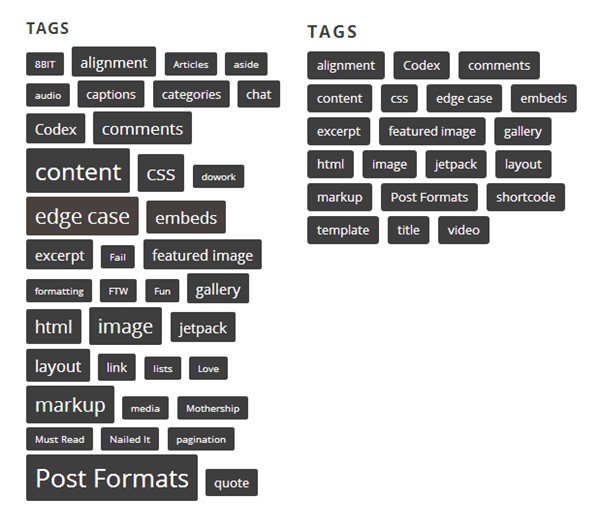
WordPress Tag Cloud Widget CSS Style
/*
 *
 * Customizing WordPress Tag Cloud
 * @link http://wp.me/p33UjS-rl
 *
 */

.tagcloud a {
    background: #333;
    border-radius: 3px;
    color: #fff;
    display: inline-block;
    margin: 2px 0;
    padding: 5px 10px;
}
WordPress Tag Cloud Widget PHP Customization
 <?php

 // Parameters accepted by tag cloud widget
 // @url http://codex.wordpress.org/Function_Reference/wp_tag_cloud

 $args = array(
    'smallest'                  => 8,
    'largest'                   => 22,
    'unit'                      => 'pt',
    'number'                    => 45,
    'format'                    => 'flat',
    'separator'                 => \\"\n\\",
    'orderby'                   => 'name',
    'order'                     => 'ASC',
    'exclude'                   => null,
    'include'                   => null,
    'topic_count_text_callback' => default_topic_count_text,
    'link'                      => 'view',
    'taxonomy'                  => 'post_tag',
    'echo'                      => true,
    'child_of'                  => null
); ?>
Sample Functions.php Code to fix Tag Cloud widget font size
<?php

// Customize font-size of tag cloud widget

add_filter('widget_tag_cloud_args','set_number_tags');
function set_number_tags($args) {
$args = array('smallest'    => 11, 'largest'    => 11);
return $args;
}
Reference: http://wpspeak.com/customize-wordpress-tag-cloud-widget/
Leave a Reply